Readings
A blood pressure and sugar log you’ll keep up
Write the number down when you take it. Kinsu keeps every reading with its time, shows the week on a chart, and has it ready when the doctor asks “how have your readings been?”
What it does
Your numbers, in one place, with their dates.
Six readings. Blood pressure, blood sugar, weight, pulse, SpO₂ and temperature. Enter what your monitor, meter or thermometer shows. Kinsu stores the value with its date and time.
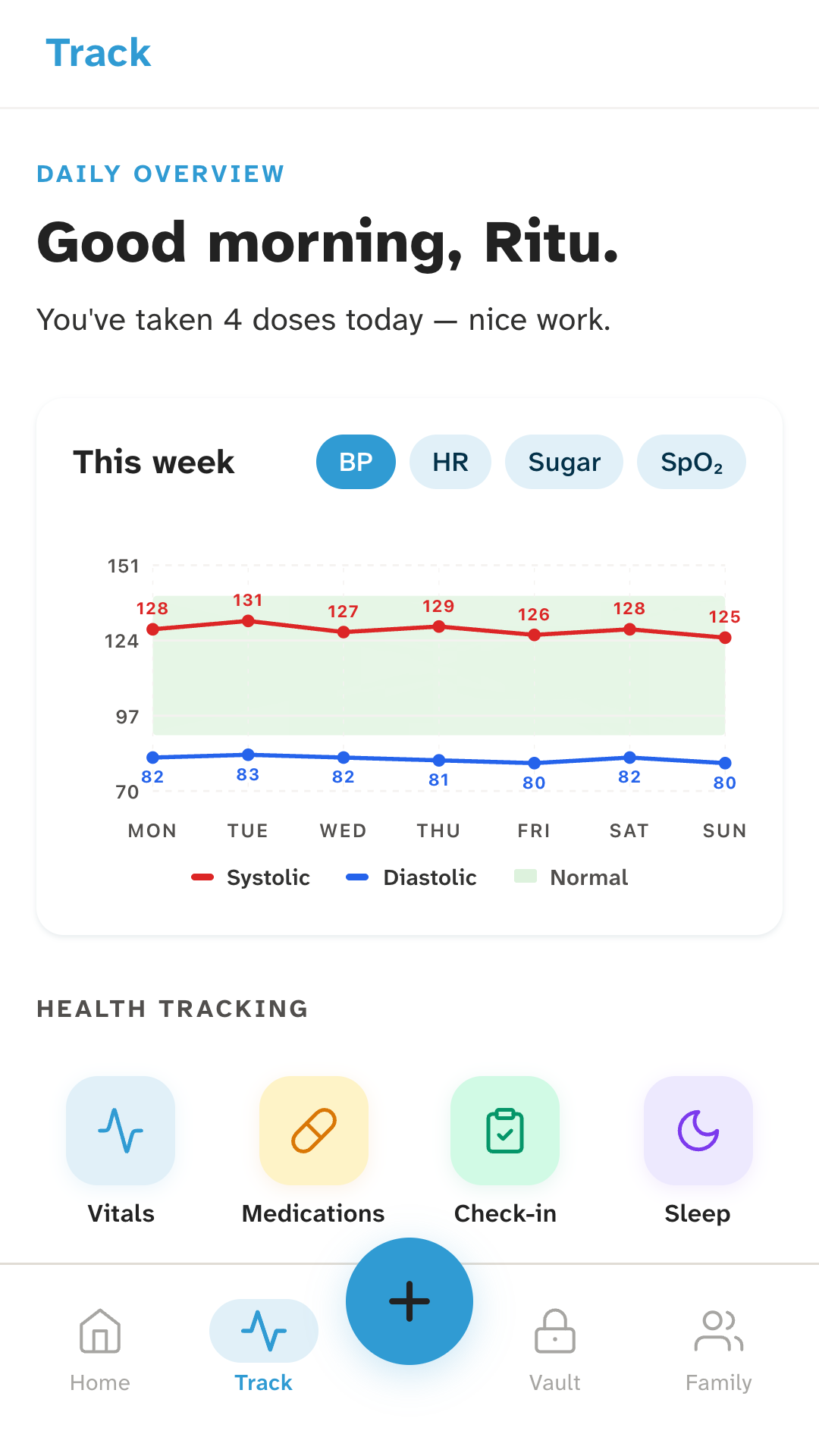
The week on a chart. Pick blood pressure, pulse, sugar or SpO₂ and see the last seven days as a line, with each day’s number on it. Logging once a day keeps the line easy to read.
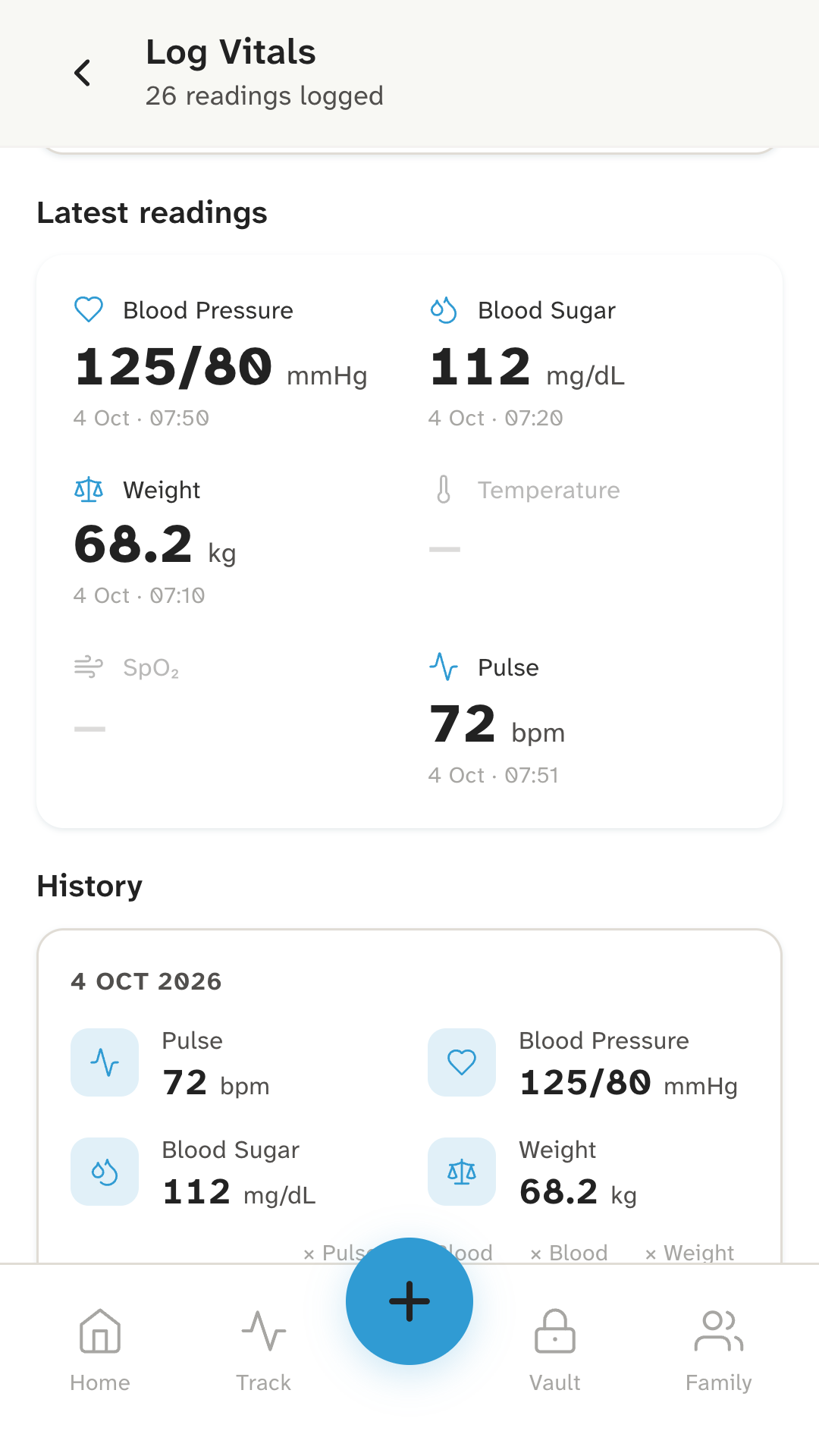
A history you can show. Your latest reading of each kind sits at the top, and every earlier one is listed by date below it. At the clinic you can open it and read the numbers out, or show the screen.
Beside your medicines. Sleep, mood, symptoms, meals and exercise can be logged too, so a bad week of readings sits next to the week you describe.
Yours to take out. You can export readings as a spreadsheet file, saved on your phone. Exported files aren’t encrypted, and the app says so.
How it works
Three steps, once a day.
- 01
Take the reading.
Use your own blood pressure monitor, glucose meter or thermometer, the way your doctor showed you.
- 02
Log it.
Open Log Vitals, type the numbers and save. Kinsu notes the time.
- 03
Look at the week.
On Track, choose BP, HR, Sugar or SpO₂ and see the line for the last seven days.
Who it’s for
For people who check a number at home.
If your doctor asked you to keep a blood pressure or sugar record, or you check once in a while and forget what it was, a log on your phone beats a slip of paper.
It works the same for a parent’s readings: record them on your phone when you visit, or ask them to keep their own. Readings aren’t kept for each family member, so a parent’s numbers share your list, and each person is better off with their own phone. Living with a long-term condition says more about what to track between visits.
Reports from the lab, such as HbA1c or a lipid profile, belong in your health records.
What it doesn’t do
The limits, plainly.
- It doesn’t measure anything.A phone can’t measure blood pressure or blood sugar. Kinsu records the numbers you read from your own device.
- It doesn’t say whether a number is good or bad.The chart shades a general reference band, the same for everyone. Your doctor decides which range suits you.
- It sends no alerts.Kinsu won’t warn you, or anyone else, about a high or low reading. If you feel unwell, don’t wait for an app: call your doctor or 112.
- It doesn’t connect to devices.There is no Bluetooth meter or wearable sync. You type each reading in.
- It isn’t a medical device.Kinsu doesn’t diagnose, treat or give medical advice.
Questions
Questions about readings.
Which readings can I log?
Blood pressure, blood sugar, weight, pulse, SpO₂ and temperature. You can also log sleep, mood, symptoms, meals and exercise, and note an illness as an episode.
Does Kinsu measure my blood pressure or sugar?
No. You type in the number from your own blood pressure monitor, glucose meter or oximeter. A phone app can’t measure blood pressure or sugar by itself, and Kinsu doesn’t claim to.
Does Kinsu tell me whether a reading is normal?
No. The weekly chart shades a general reference band, the same for everyone. It isn’t tailored to your age or condition and it isn’t advice. Ask your doctor which numbers are right for you.
How do I show my readings to my doctor?
Open the chart or the history in Kinsu and show the screen. You can also export your readings as a spreadsheet file, saved on your phone. Exported files aren’t encrypted, so keep them somewhere safe.
Be the first to know when Kinsu is on Google Play.
Kinsu isn’t on Google Play yet. Leave your email and we’ll write once, on the day it is.