Health records
A health records app for the family file
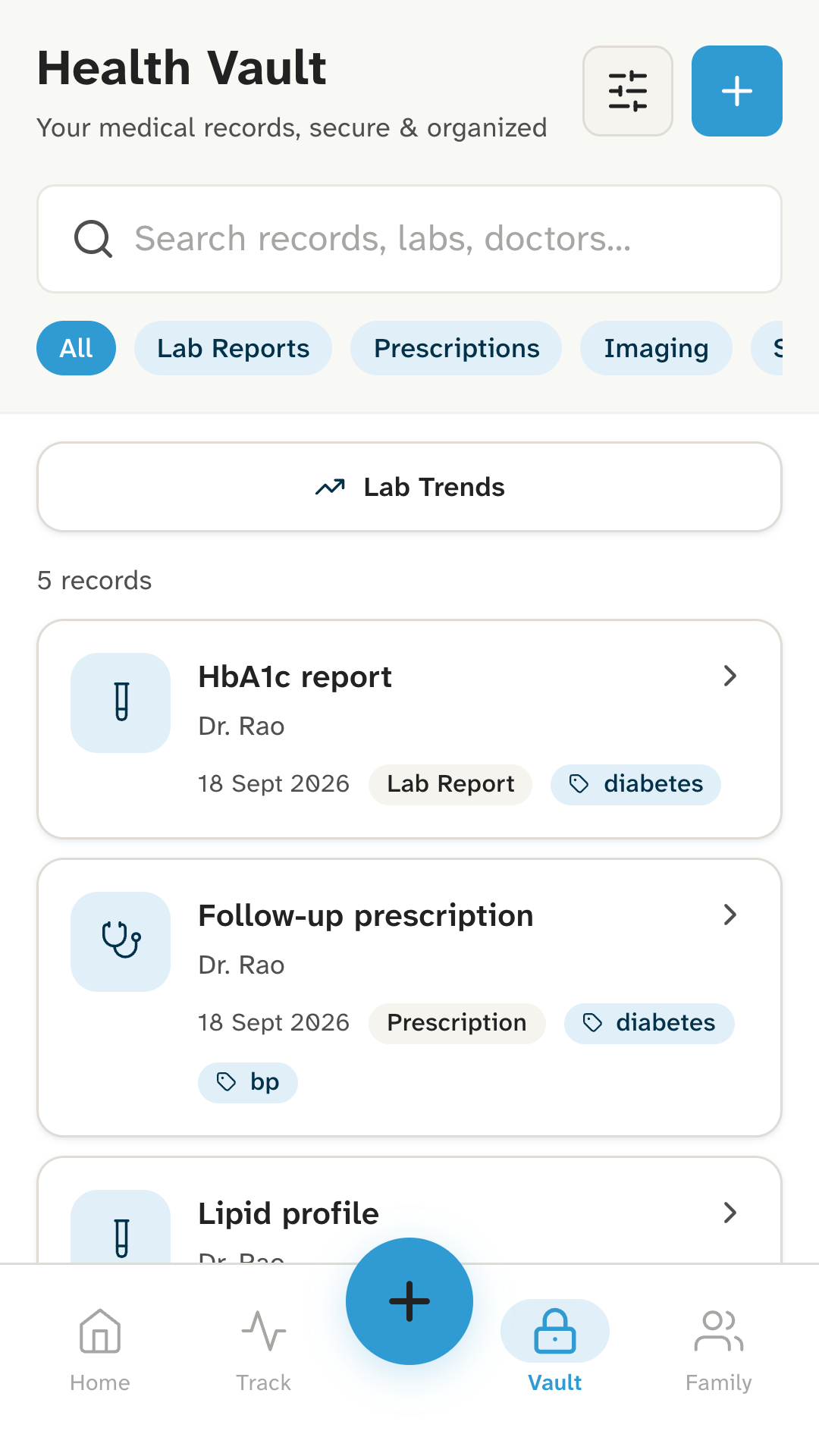
Most families keep a plastic folder of papers, with the rest in the phone’s gallery and old WhatsApp chats. Kinsu puts them in one place on your phone, labelled and easy to find.
What it does
Every report, where you can find it.
Add it however you have it. Photograph a paper with your camera, pick a photo from your gallery, or add a file such as a PDF or Word document. Crop a photo to the page before you save it.
Label it once. Give it a name, the doctor and the date, add tags if you like, and choose its type: prescription, lab report, scan, discharge summary, insurance or other.
Find it in the clinic. Search by name, doctor or tag, or filter by type. PDFs open inside the app, so the doctor can read last year’s report on your screen.
Keep the family’s papers too. Add family members and choose whose each record is. Switch between people in the vault to see only theirs.
Take a copy out when you need one. Save a document to your phone’s Downloads folder, or export the records you choose as spreadsheet files.
How it works
From the folder to your phone.
- 01
Photograph or pick it.
Use your camera for a paper, or choose a photo or file you already have, such as a lab’s PDF.
- 02
Label it.
Name, doctor, date, type and whose it is. A few seconds now saves the hunt later.
- 03
Find it later.
At the next appointment, search “thyroid” or the doctor’s name and open it right there.
- RxPrescriptionSep 2026
- LabHbA1c reportSep 2026
- LabThyroid profileMar 2026
- ScanUltrasound, abdomenJan 2026
- Disch.Discharge summaryNov 2025
- RxCardiology follow-upDec 2025
Who it’s for
Whoever carries the file to the doctor.
If you’ve ever been asked for “the old report” and couldn’t find it, this is for you. It helps most when there are several doctors, several years of reports, or several people’s papers in one folder.
Parents keep a child’s vaccination card and paediatrician’s reports under the child’s name. Grown-up children keep their parents’ papers labelled by person. See caring for your parents.
What it doesn’t do
The limits, plainly.
- It doesn’t read your reports.Kinsu keeps the photo or file and the details you type in. It doesn’t read, interpret or explain results: your doctor does.
- Reports don’t arrive by themselves.Kinsu isn’t connected to labs, hospitals, ABHA or ABDM. You add each record.
- No cloud backup.Records live only on your phone. If you lose the phone, they go with it. Export gives you a copy to keep elsewhere; the files aren’t encrypted, so keep them safe.
- No sharing, yet.Nobody else can open your records. To show a doctor, you show them your phone.
- It doesn’t replace the paper.Keep the originals: hospitals and insurance claims often ask for them.
Questions
Questions about records.
Can Kinsu read or explain my lab report?
No. Kinsu keeps the photo or file and the details you type in, such as the name, doctor, date and tags. It doesn’t read or interpret reports: your doctor does.
What can I add to the vault?
Photos from your camera or gallery, and files such as PDFs and Word documents. You can crop a photo to the page before you save it, and PDFs open inside the app.
Can I keep my mother’s reports separate from mine?
Yes. Add her in Family and choose her name when you save a record. In the vault, switch between people to see only hers.
Should I still keep the paper originals?
Yes. Hospitals and insurance claims often ask for originals, and a photo is only a copy. Kinsu helps you find the right page quickly; it doesn’t replace the paper.
Be the first to know when Kinsu is on Google Play.
Kinsu isn’t on Google Play yet. Leave your email and we’ll write once, on the day it is.